


If you are thinking about sending mass emails with Gmail, it helps to know its limits and what you put at risk first. What looks like a saving can end up costing you the reputation of your domain.
Gmail is a free Google service and opening an account takes a few minutes. That is why it is tempting to use it for a large mailing and save time and money. But is it true that cheap ends up being expensive?
In 30 seconds
- A Gmail account lets you send up to 500 emails a day and up to 500 recipients per message.
- Gmail is not built for campaigns: it gives you no open or click statistics.
- A poorly run mass mailing hurts the sender’s reputation and sends your emails to the spam folder.
- Since February 2024, Gmail requires domain authentication and one-click unsubscribe for anyone sending more than 5,000 messages a day.
How to send mass emails with Gmail
Sending the same email to many people with Gmail is possible up to a point, because the service is designed so anyone can communicate by email with no technical knowledge. But a mass mailing is a professional activity, and the ideal is to use a tool built for it. Even so, these are the steps:
- Sign in to your Gmail account.
- Click “Compose”.
- Click “To” to open your contacts and choose who will receive the message.
- Review the list and remove anyone who should not get it.
- Write the subject and the content, and send it.
The process is simple. But if you want to send a mass mailing, it is because you need to reach many people, and that is when the limits show up.
How far can Gmail really go?
According to Gmail Help, an account can send up to 500 emails a day and up to 500 recipients in a single message. If you go over the limit, Gmail shows the message “You have reached a limit for sending mail” and you can usually send again within 1 to 24 hours.
The reason is simple: Google does not want any account to be able to fill other people’s inboxes with unwanted messages. For personal use, 500 messages a day is more than enough.
But what if your contact list is far larger than 500? A mass mailing is a way to get closer to your customers and promote your brand, and for that you need another tool.
Why you should not send mass emails with Gmail
Email marketing is a very useful tool to win customers, keep them and turn them into brand ambassadors. But a personal mailbox like Gmail has limits: mass mailings sent with a personal account do not have the setup or the control of a professional email marketing platform.
In other words: you run a higher risk of being seen as a spam sender. And there are three more reasons.
1. Lower deliverability

The biggest problem of an email campaign is not that the message goes unopened or that nobody clicks: it is that it never reaches the inbox at all. A personal account is not designed for mass mailings, and when the same message goes out to hundreds of addresses, filters may send it to the spam folder.
Also, Gmail does not have the segmentation and personalization tools of an email marketing platform, which let each contact receive a message that speaks to them.
2. There are no statistics in Gmail
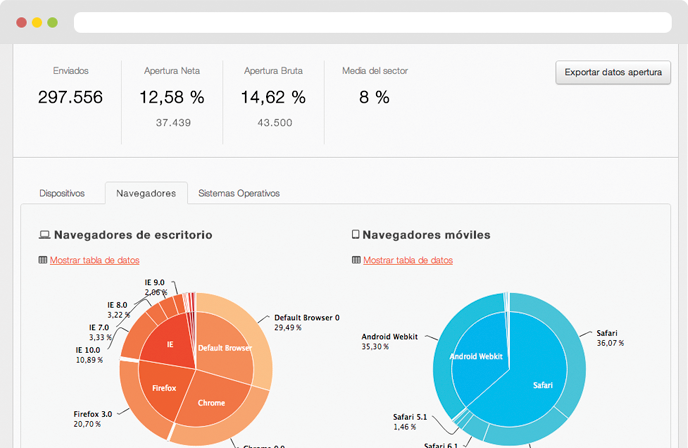
Unlike email marketing platforms, Gmail does not tell you what happened to your messages: there are no open, click or bounce reports.
And if you cannot measure a campaign, you do not know whether it worked or what to change in the next one. Statistics are how you know what you are doing well and what you should adjust.
3. You will get a bad reputation
A sender earns a good reputation when many people open and click its emails, and loses it when recipients do not interact or mark them as unwanted. Mail providers and filters consider, among other factors:
- How often you send.
- Addresses that no longer exist.
- How many times users mark you as spam.
- Trap addresses that filters use to detect bought or old lists.
A personal account also does not handle unsubscribes and bounces the way an email marketing platform does. The result is a low-quality, unsegmented database and a reputation that is hard to recover.
What Gmail requires today for bulk mailings
Since February 1, 2024, Google asks anyone sending more than 5,000 messages a day to Gmail accounts to follow its email sender guidelines:
- Authenticate the domain with SPF, DKIM and DMARC.
- Allow one-click unsubscribe in marketing messages, with a visible link in the body of the email.
- Keep the spam rate below 0.30% in Postmaster Tools (Google recommends aiming for 0.10%).
Email marketing platforms include these features. A personal Gmail account does not.
What is the solution?
A mass email campaign needs careful planning: a contact list of people who agreed to receive your messages, an authenticated domain and a tool that measures results. Do not put your domain’s reputation at risk or expose yourself to blocks on your email account.
Keep the two uses apart. For everyday email, use accounts on your own domain: every Damos web hosting plan includes the webmail platform, with email accounts on your own domain. For campaigns, use an email marketing platform; if you also want to connect your mailings to a CRM and automations, see our Clientify implementation.
Already have your domain and business email? Check what each web hosting plan with email on your domain includes.
Frequently asked questions
How many emails can I send a day with Gmail?
Up to 500 emails a day and up to 500 recipients per message, according to Gmail Help. If you go over the limit, you can usually send again within 1 to 24 hours.
Why is it a bad idea to send mass emails with Gmail?
Because Gmail is not built for campaigns: it gives no statistics, does not handle unsubscribes or bounces, and raises the risk of your messages ending up in the spam folder.
What does Gmail ask of bulk senders?
Since February 2024, anyone sending more than 5,000 messages a day must authenticate the domain with SPF, DKIM and DMARC, allow one-click unsubscribe and keep the spam rate below 0.30%.
Want professional email on your own domain?
Tell us how many accounts you need and how your team works, and we will help you choose the plan.
Let’s talkKeep reading
Sources: Gmail Help, sending limits · Google, email sender guidelines. The original article was based on a piece by Antevenio, which we adapted and reviewed; example images: Antevenio.