


In addition to your hosting service, we invite you to explore three alternatives to the Webmail platform included with it: Zoho Mail, Google Workspace and Microsoft 365. Email platforms outside your hosting are always an excellent option if you are looking for better performance, stability and complementary collaboration tools.
Email on your own domain (yourname@yourcompany.com) is one of the tools a business uses most and reviews least, until it fails: a full mailbox, messages landing in spam, or a team that can't share calendars. In this post we explain when your hosting webmail is enough, when an external platform makes sense, and what to keep in mind before migrating.
In 30 seconds
- Hosting webmail works well for small teams that only need to send and receive email on their domain.
- An external platform adds more storage, mobile apps, calendar, video calls and shared files.
- Zoho Mail has a free plan for up to 5 users; Google Workspace and Microsoft 365 are full paid suites.
- A domain uses only one email platform at a time: decide before changing the MX records.
- Authenticate your domain (SPF, DKIM and DMARC) so your emails don't end up in spam.
Hosting webmail or an external platform?
All our web hosting plans include webmail accounts on your domain: from 10 accounts on the Basic plan to 50 on the Pro plan. For many businesses that's enough: they send and receive email, set it up on their phone or in Outlook, and need nothing else.
An external platform starts to make sense when you see any of these signs:
- Mailboxes filling up: the team handles heavy attachments or needs to keep years of history.
- Teamwork: shared calendars, video calls, online documents or shared folders.
- Mobility: full sync of email, contacts and calendar across several devices.
- Central administration: creating and suspending users, applying security policies, or recovering the account of someone who left the company.
Quick comparison of the alternatives
| Platform | Email storage | What it adds | Best for |
|---|---|---|---|
| Hosting webmail | Depends on the hosting plan | Email on your domain at no extra cost | Small teams with basic use |
| Zoho Mail (free plan) | 5 GB per user, up to 5 users | Web access and Zoho apps; no IMAP/POP | Businesses just starting |
| Google Workspace Business Starter | 30 GB per user (pooled with Drive) | Gmail, Drive, Meet, Calendar and Gemini | Teams that collaborate online |
| Microsoft 365 Business Basic | Mailbox of up to 100 GB | Outlook, Teams, OneDrive and Office web apps | Businesses that work in Word and Excel |
Data from the official pages of Zoho, Google and Microsoft as of November 2026. Prices change often and vary by country, so confirm them on each site.
The three alternatives, one by one
ZOHO MAIL
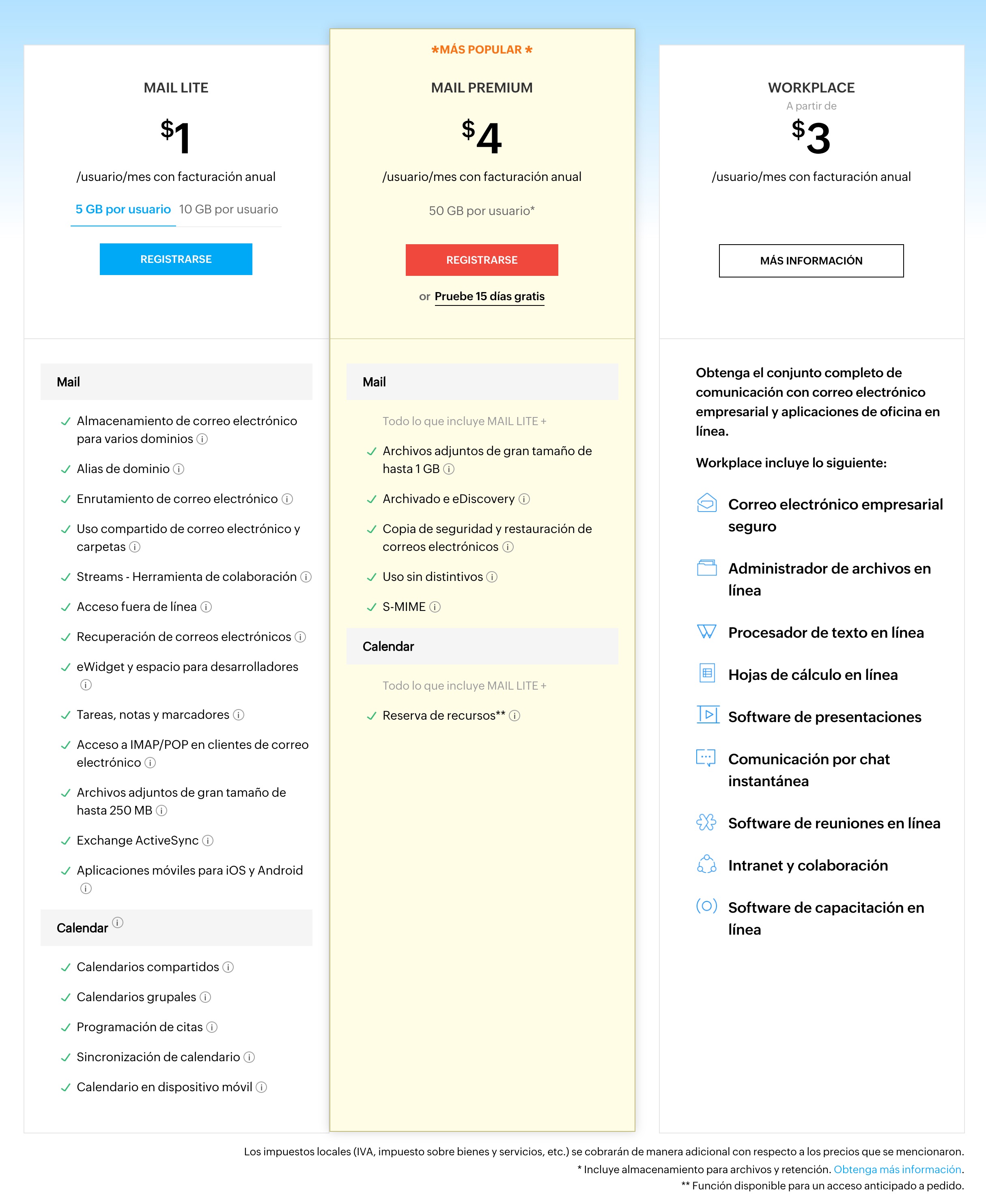
Zoho Mail is the most affordable way to start. Its free plan hosts email for one domain for up to 5 users, with 5 GB per user and attachments up to 25 MB. The catch: it only works through the web and its mobile apps, because IMAP, POP and ActiveSync are not included. If you add a sixth user, the whole organization has to move to a paid plan.
GOOGLE WORKSPACE
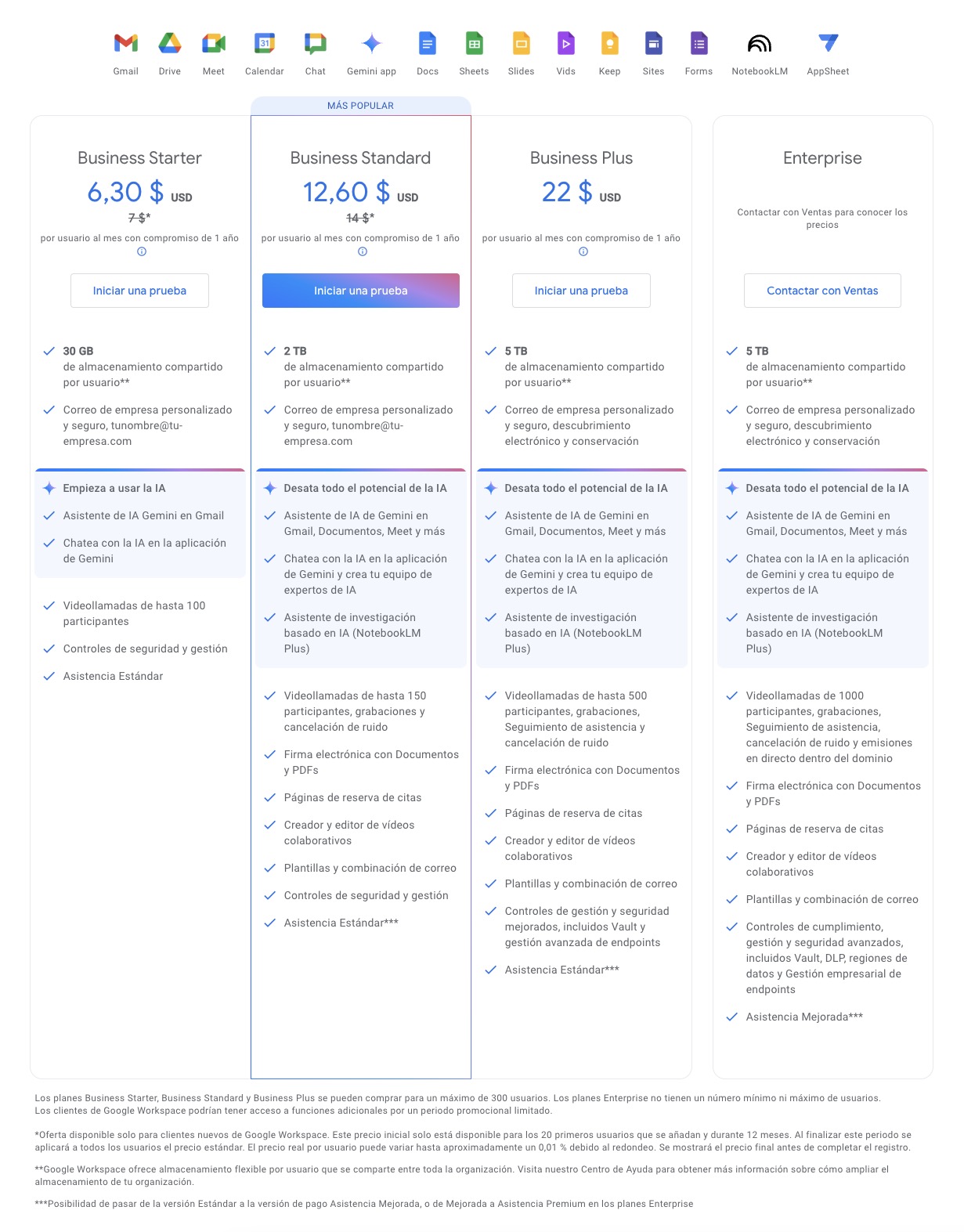
Google Workspace brings Gmail to your domain and combines it with Drive, Meet, Calendar and collaborative documents. The Business Starter plan includes 30 GB per user, pooled between email and files, and higher plans go up to 2 TB and 5 TB. It is the suite we use at Damos and the one we implement for our hosting clients when they need collaboration tools. To go deeper, read Gmail for business: 6 reasons to choose it.
MICROSOFT 365
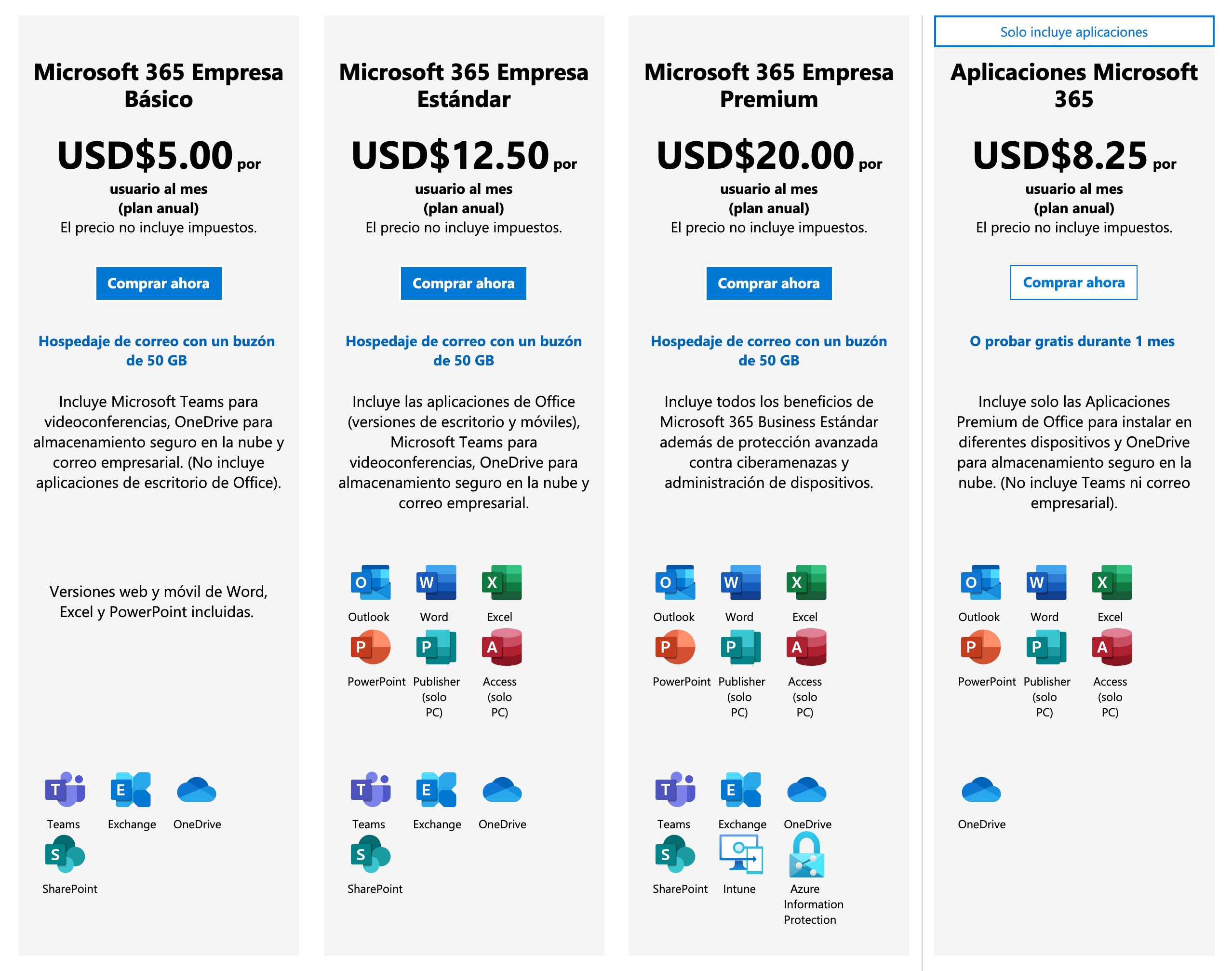
Microsoft 365 is the natural choice if your team lives in Outlook, Word and Excel. In 2026 Microsoft expanded the mailbox on Business Basic, Standard and Premium from 50 GB to 100 GB per user. Business Basic includes email, Teams, OneDrive and the web versions of Office; higher plans add the desktop apps.
How to choose the right platform
A quick guide
- Up to 5 people on a tight budget: free Zoho Mail, accepting that it runs through its web and apps.
- A team that shares documents and runs video calls: Google Workspace.
- A company that depends on desktop Word, Excel and Outlook: Microsoft 365.
- Basic email on your domain: the webmail included in your hosting is still enough.
If you stay with webmail, our Roundcube user guide shows you how to make the most of it. And if you are thinking of using email for campaigns, first read why not to send bulk email from Gmail.
How to migrate without losing email
- Take inventory. List the accounts, aliases and forwards you have today, and decide which ones move to the new platform.
- Verify the domain on the chosen platform with the record it gives you (usually a TXT record in your DNS).
- Migrate the history with the platform's import tool, which copies your email over IMAP from your webmail.
- Change the MX records so new email reaches the new platform. Do it during a low-traffic time.
- Set up SPF, DKIM and DMARC. Since February 2024, Google requires SPF or DKIM from everyone who sends email to personal Gmail accounts, and without DMARC your domain is easier to spoof.
- Check everyone's devices and remove the old accounts to avoid confusion.
If your domain and hosting are with us, our technical support will guide you through the DNS changes. See the Damos web hosting plans and the email each one includes.
At Damos we manage our clients' hosting, domains and email, and we recommend one platform or another based on how each team works, not on trends. Is your current email too small for your business?
Frequently asked questions
Can I use my hosting webmail and Google Workspace at the same time?
Not with the same domain. A domain can only receive email on one platform at a time, because its MX records point to a single service. That's why you should choose the platform before migrating.
Is Zoho Mail free for businesses?
Zoho Mail has a free plan for one domain, with up to 5 users and 5 GB per user. It only works through the web and its apps, with no IMAP or POP. If you need more users, the whole organization must move to a paid plan.
Which email platform is best for me?
It depends on how your team works: Zoho Mail to start on a small budget, Google Workspace if you collaborate on documents and video calls, Microsoft 365 if you depend on Word, Excel and Outlook, and hosting webmail for basic use.
Will I lose my emails if I switch platforms?
No, as long as you migrate your history before changing the MX records. Google Workspace, Microsoft 365 and Zoho have tools to import email over IMAP from your webmail.
Why do my emails go to spam?
A common cause is that the domain doesn't have SPF, DKIM and DMARC set up. Google requires at least SPF or DKIM to deliver email to personal Gmail accounts. Check these records every time you switch platforms.
Need help with your business email?
Tell us how your team works and we'll recommend the email platform that fits best.
Talk to an advisorKeep reading
Sources: Zoho Mail, plans and pricing · Google Workspace, Business editions comparison · Microsoft Exchange Team, 100 GB mailbox in Microsoft 365 Business (August 2026) · Google, email sender guidelines