


On any website, images take center stage: texts aren’t always read, but images are always seen. That’s why most companies want lots of large photos on their pages.
The problem is that images are usually the heaviest part of a page, more than styles, scripts or fonts. And load speed matters: a slow page hurts your visitors’ experience and your Google ranking too. That’s why every web designer has a love-hate relationship with images. In this guide we explain how WebP and AVIF help solve it.
In 30 seconds
- JPG, PNG and GIF have dominated the internet since the nineties, each for a different strength.
- WebP (Google, 2010) weighs quite a bit less than JPG and supports transparency and animation.
- AVIF (2019) compresses even more than WebP with similar quality.
- Today both work in almost every browser; ideally, serve them with a JPG fallback.
The challenge: compression, quality and compatibility
Finding the perfect image format has always been a battle in web development, because three factors have to be balanced:
- Compression: the less a file weighs, the less data must be downloaded and the less the visitor waits.
- Quality: more compression usually means less quality, which is very noticeable on high-resolution screens.
- Compatibility: an excellent format is useless if the most popular browsers don’t recognize it.
JPG, PNG and GIF: the old guard
Since the early nineties, three formats have ruled the internet, and each stood out for something the others lacked:
| Format | Its strength | Typical use |
|---|---|---|
| JPG (Joint Photographic Experts Group) | Good compression; the most common format on the web. | Photographs. |
| PNG (Portable Network Graphics) | Supports transparency (alpha channel) and lots of detail, but compresses little. | Logos and flat images. |
| GIF (Graphics Interchange Format) | Simple animations. | Today more on social media than on websites. |
GIF survived the rise of Flash in the 2000s and the arrival of video and CSS animations thanks to its huge popularity, although today it’s used more on social media than on websites.
WebP: Google’s bet
It took two decades for something to change. In its goal of making the web faster, Google built a format that compressed better than JPG and had PNG’s quality and transparency: that’s how WebP was born, an open-source format that Chrome and Android started supporting and that has kept gaining ground ever since.
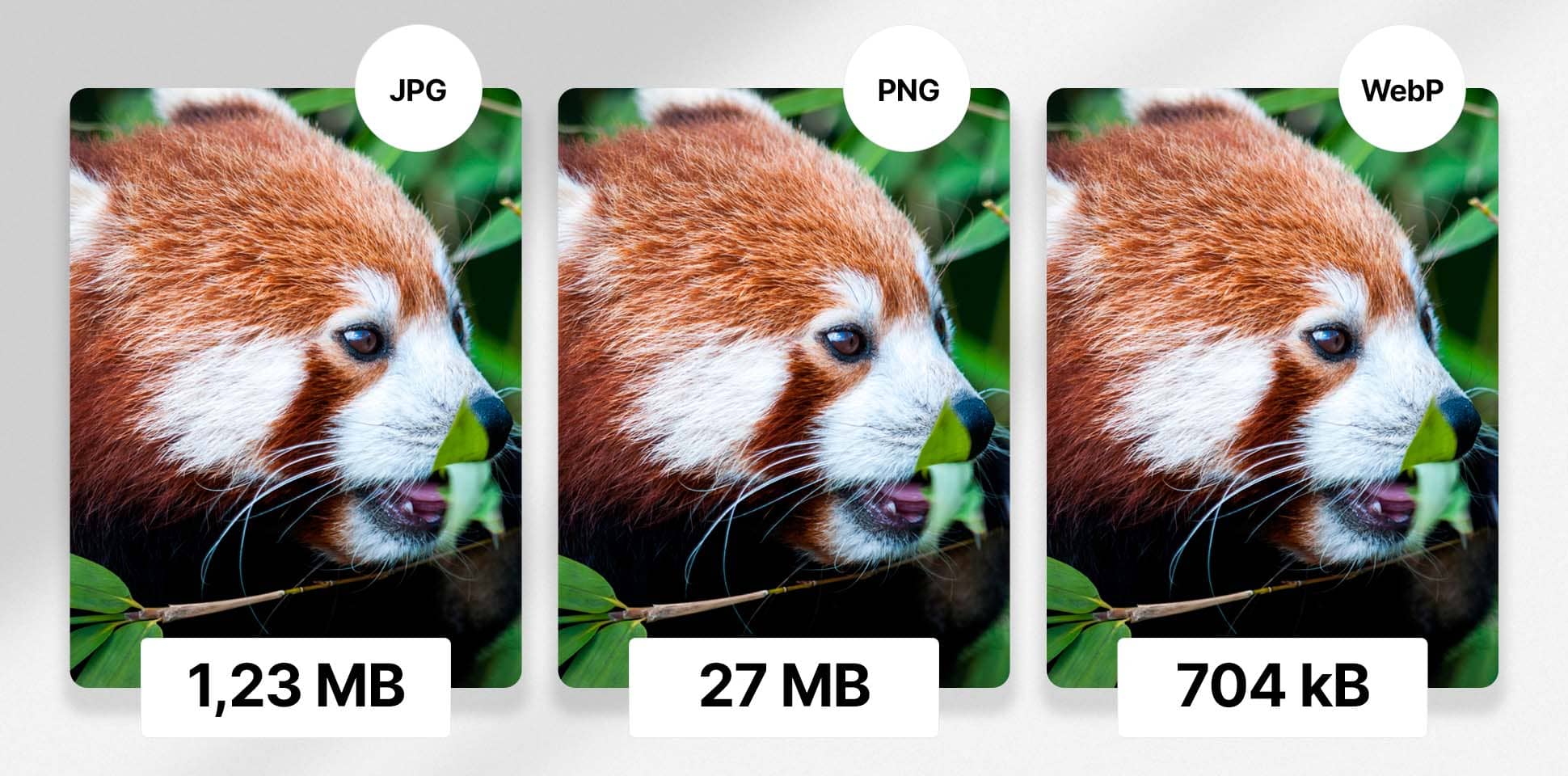
In this article’s original comparison, the WebP image weighed about 40% less than the same image in JPG, with similar quality. Imagine how much data you’d save your visitors by applying that reduction to every image on your site.
Also, since it supports transparency and animation, WebP is a good replacement for PNG and GIF too.
AVIF: young but very efficient
In 2019, as WebP was becoming popular, AVIF arrived, developed by the Alliance for Open Media, a nonprofit backed by companies such as Netflix, Amazon, Google and Apple that aims to build open technologies free of patent disputes. Its big contribution: it compresses much better than JPG and even better than WebP.

With the same image as in the previous example, while WebP cut the weight by about 40% compared with JPG, AVIF cut it by around 80%, with no visible difference. According to the WordPress team, AVIF images can be up to 50% smaller than JPEGs at the same quality.
AVIF also performs well on flat images such as graphics and logos (although SVG is still best for logos), and like WebP it supports transparency and animation.
Increasingly accepted: compatibility in 2026
For years, compatibility was the big obstacle for these formats: since many browsers didn’t display them, designers preferred sticking with JPG, PNG and GIF. That has changed.
- WebP works in every major browser: Chrome and Opera supported it first; Edge and Firefox followed in 2019, and Safari joined with macOS Big Sur at the end of 2020.
- AVIF arrived first in Chrome 85, in August 2020, and later in Firefox, Opera and Android browsers. According to Can I use, Safari fully supports it since version 16.4 and Edge since version 121, and today it has 96.71% global support.
In other words: almost all your visitors can already see WebP and AVIF images.
How to use the new image formats on your website
You can put a WebP or AVIF image in an img tag just as you would a JPG or PNG. But the few visitors with old browsers would see nothing. The solution is to use the picture element with several options:
<picture>
  <source srcset="your-image.avif" type="image/avif">
  <source srcset="your-image.webp" type="image/webp">
  <img src="your-image.jpg" alt="Image description">
</picture>
The browser loads the first option it recognizes and, if it recognizes none, it uses the JPG.
If you order the options from lightest to heaviest, each visitor will see the best image their browser allows, and nobody will be left without an image.
How to produce WebP and AVIF images
Producing these formats is much easier than a few years ago:
Options for your case
- If your site runs on WordPress: it supports WebP since version 5.8 and AVIF since 6.5 (April 2024), as long as your server has a compatible image library. To convert the images you upload automatically, there are free and paid extensions.
- If your site is custom-built: free web tools like Squoosh, one of our favorites, convert your JPGs to WebP or AVIF in seconds. There are also Node.js modules to automate it.
- If your site runs on our CMS: every image you upload is also saved in WebP automatically, without you doing anything.
Improving your site’s load speed is one of the hardest tasks, but also one of the most rewarding. You can work on several fronts (a better server, fewer requests, a CDN, minified code), but few things have as much impact as reducing your images’ weight. Using WebP and AVIF makes your site faster and more comfortable without your visitors noticing any loss of quality. To see how speed affects your sales, read our article on Core Web Vitals.
At Damos we build fast sites at the core: learn about the advantages of our CMS, which optimizes your images for you, and if your current site is slow, tell us and we’ll review what’s holding it back. See more on our content management system page.
What format are your site’s images in today?
Frequently asked questions
Which is better, WebP or AVIF?
AVIF usually compresses more than WebP with similar quality, but WebP is faster to produce and has been in browsers longer. Ideally, offer AVIF with WebP and JPG as fallbacks.
Do all browsers support AVIF?
Almost all. According to Can I use, AVIF has 96.71% global support; Safari fully supports it since version 16.4 and Edge since version 121.
How much does a WebP image weigh compared with a JPG?
It depends on the image, but in this article’s comparison the WebP weighed about 40% less than the JPG with similar quality, and the AVIF around 80% less.
Does WordPress support WebP and AVIF?
Yes. WordPress supports WebP since version 5.8 and AVIF since 6.5, as long as your server’s image library is compatible.
How do I convert my images to WebP or AVIF?
With free tools like Squoosh, with extensions for your CMS or with programming modules. If your site runs on the Damos CMS, WebP versions are produced automatically.
Is your site loading slowly?
We review your images, your server and your code, and tell you what’s holding it back.
Let’s talkKeep reading
Sources: text based on an article by okbinteractive.studio, rewritten, refreshed and expanded by DAMOS Soluciones · Example images: okbinteractive.studio · Can I use, AVIF · WordPress, AVIF in version 6.5.